Using MyAlphaPics
From first install to Smart Practice — here's everything you need to get your child learning letters and numbers with an app that feels like it was made just for them.
Three steps to start
Install the App
Add it to your home screen — no app store, no download.
Set It Up
Add your child's name and a few photos. Takes a few minutes — and the counting games are ready instantly.
Let Smart Practice Work
After a few days of play, the app focuses on the letters and numbers that need attention.
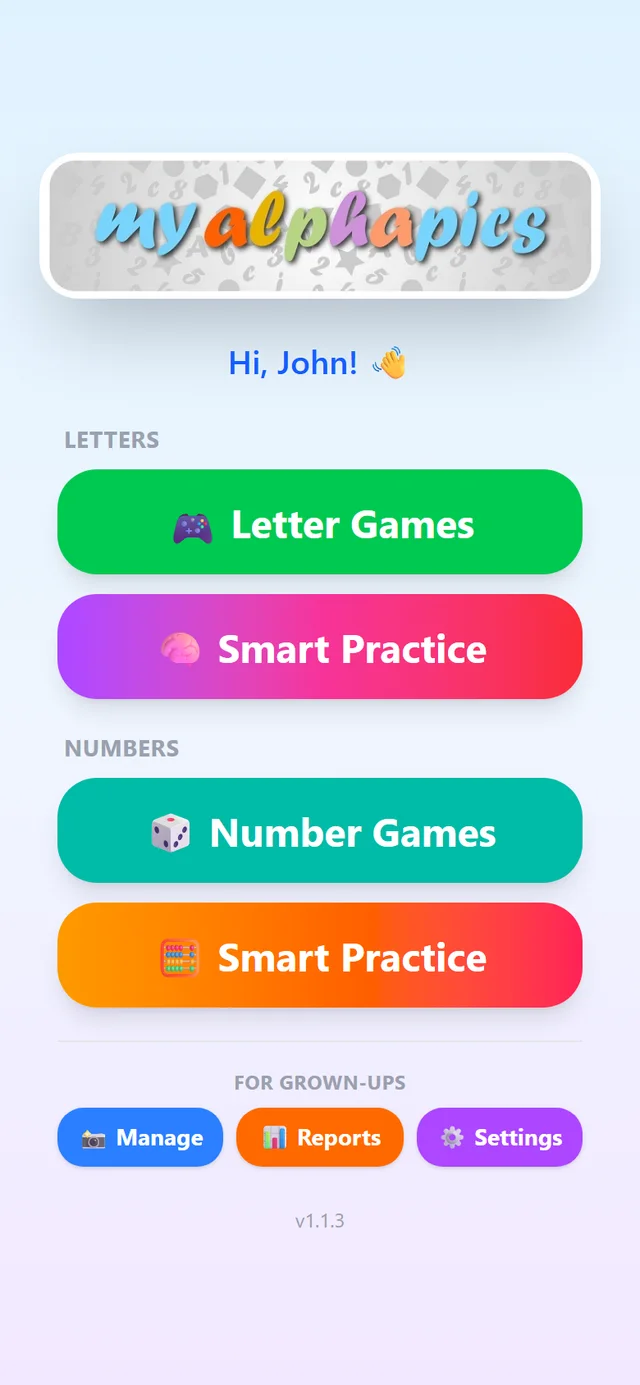
The main menu, at a glance
Everything is grouped by subject. Letters and Numbers each get two buttons — the games, and a Smart Practice that focuses on whatever your child finds hardest. The For Grown-Ups row at the bottom holds the parent tools: Management for photos and words, Reports for progress, and Settings. Your child's half of the screen is all play; yours stays tucked out of reach of little fingers.
Where would you like to start?
Jump straight to the section you need.
- Get the App on Your PhoneNo app store required. MyAlphaPics installs directly to your home screen in about a minute — on Android or iPhone. Works offline too, so your child can play anywhere. Step-by-step guide.
- Setting Up for Your ChildAdd your child's name and a few photos and the game is ready to play. Or go further — replace any letter with a word and photo from your child's own world. J for Jet becomes J for John. Setup walkthrough.
- How Smart Practice WorksAfter a few days of play, MyAlphaPics knows which letters and numbers your child is finding hard. Smart Practice builds a focused session around exactly those — more practice where it's needed, less where it isn't. See how it works.
- The Counting GamesSix counting games, from watch-and-count to counting the cousins inside a single family photo. They automatically use the photos already in the app, so there's nothing extra to set up — and you choose how high to count as your child grows. Meet the counting games.
Everything stays on your device
Your family photos, your child's name, their progress data — none of it ever leaves your phone. MyAlphaPics works completely offline once installed. There are no accounts, no cloud sync, and nothing stored on our servers. What happens on your phone stays on your phone.